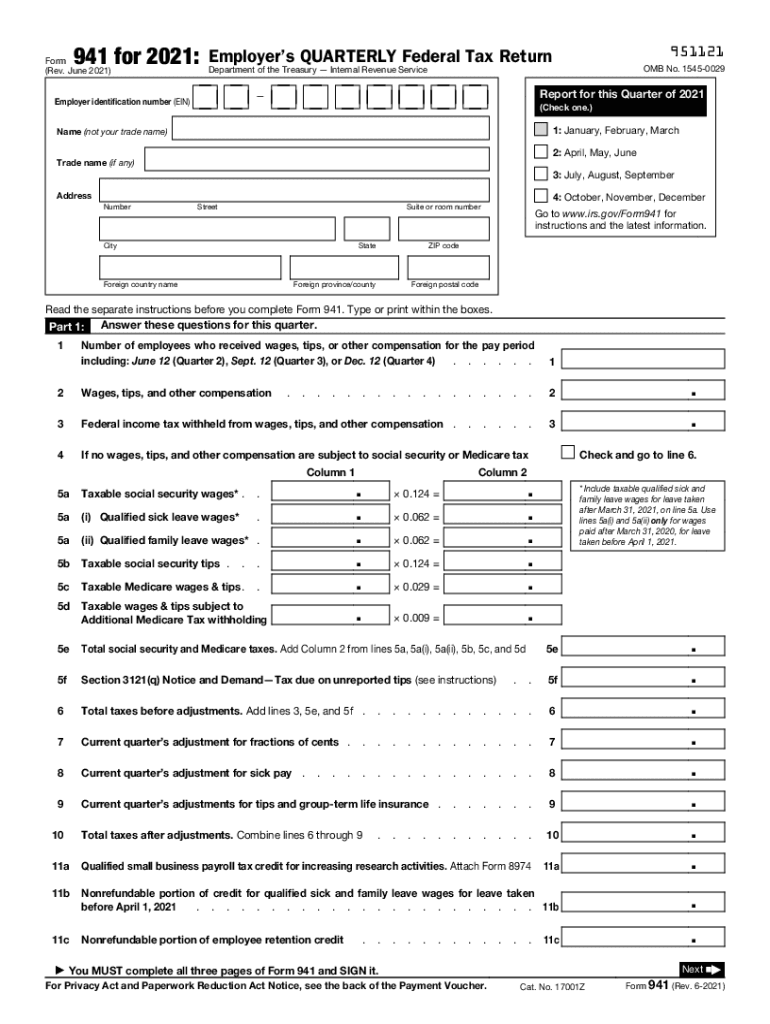
Federal Tax Return Schedule C Form 941 Instructions 2021


What is the Federal Tax Return Schedule C Form 941?
The Federal Tax Return Schedule C Form 941 is a crucial document used by employers in the United States to report income taxes, Social Security tax, and Medicare tax withheld from employee wages. This form is typically filed quarterly and is essential for maintaining compliance with federal tax regulations. The 941 form provides the IRS with detailed information about the number of employees, wages paid, and taxes withheld, ensuring that businesses meet their tax obligations accurately and on time.
Steps to Complete the Federal Tax Return Schedule C Form 941
Completing the Federal Tax Return Schedule C Form 941 involves several key steps to ensure accuracy and compliance:
- Gather necessary information, including total wages paid, taxes withheld, and the number of employees.
- Fill out the form with accurate figures, ensuring all calculations are correct.
- Review the form for any errors or omissions before submission.
- Sign and date the form to validate the information provided.
- Submit the completed form by the appropriate deadline to avoid penalties.
Filing Deadlines / Important Dates
Filing deadlines for the Federal Tax Return Schedule C Form 941 are critical for compliance. The form is due four times a year, with specific deadlines for each quarter:
- For the 1st quarter (January to March), the deadline is April 30.
- For the 2nd quarter (April to June), the deadline is July 31.
- For the 3rd quarter (July to September), the deadline is October 31.
- For the 4th quarter (October to December), the deadline is January 31 of the following year.
Legal Use of the Federal Tax Return Schedule C Form 941
The legal use of the Federal Tax Return Schedule C Form 941 is governed by IRS guidelines, which stipulate that employers must accurately report their payroll taxes. Failure to file or incorrect reporting can lead to significant penalties. The form serves as a legal document that verifies compliance with federal tax laws and ensures that the appropriate taxes are collected and remitted to the IRS.
Who Issues the Form?
The Federal Tax Return Schedule C Form 941 is issued by the Internal Revenue Service (IRS). The IRS is responsible for creating and updating the form, providing guidelines for its use, and ensuring that employers understand their obligations regarding payroll tax reporting. Employers can obtain the form directly from the IRS website or through authorized tax professionals.
Penalties for Non-Compliance
Non-compliance with the requirements of the Federal Tax Return Schedule C Form 941 can result in various penalties. These may include:
- Failure to file penalties, which can accumulate over time.
- Failure to pay penalties for taxes owed that are not paid by the deadline.
- Interest on unpaid taxes, which compounds until the balance is settled.
It is essential for employers to stay informed about their filing requirements to avoid these penalties.
Quick guide on how to complete federal tax return schedule c form 941 2019 instructions
Execute Federal Tax Return Schedule C Form 941 Instructions effortlessly on any gadget
Online document management has gained traction among businesses and individuals. It offers an ideal eco-friendly alternative to traditional printed and signed papers, allowing you to obtain the correct form and securely store it online. airSlate SignNow equips you with all the resources necessary to create, modify, and eSign your documents swiftly without hindrances. Handle Federal Tax Return Schedule C Form 941 Instructions on any system with airSlate SignNow Android or iOS applications and enhance any document-oriented process today.
How to modify and eSign Federal Tax Return Schedule C Form 941 Instructions without any hassle
- Obtain Federal Tax Return Schedule C Form 941 Instructions and click Get Form to begin.
- Utilize the tools we provide to complete your document.
- Highlight important sections of your documents or obscure sensitive details with tools that airSlate SignNow supplies specifically for that purpose.
- Create your signature using the Sign tool, which takes mere seconds and holds the same legal validity as a conventional wet ink signature.
- Review the information and click on the Done button to save your modifications.
- Choose how you wish to deliver your form, via email, SMS, or invitation link, or download it to your computer.
Eliminate worries about lost or misplaced files, tedious form searches, or errors that necessitate the printing of new document copies. airSlate SignNow addresses all your document management needs in just a few clicks from a device of your choice. Modify and eSign Federal Tax Return Schedule C Form 941 Instructions and ensure exceptional communication at every stage of the form preparation process with airSlate SignNow.
Create this form in 5 minutes or less
Find and fill out the correct federal tax return schedule c form 941 2019 instructions
Create this form in 5 minutes!
How to create an eSignature for the federal tax return schedule c form 941 2019 instructions
The best way to make an electronic signature for your PDF in the online mode
The best way to make an electronic signature for your PDF in Chrome
The best way to generate an electronic signature for putting it on PDFs in Gmail
How to generate an eSignature right from your smart phone
How to generate an electronic signature for a PDF on iOS devices
How to generate an eSignature for a PDF on Android OS
People also ask
-
What are the Federal Tax Return Schedule C Form 941 Instructions?
The Federal Tax Return Schedule C Form 941 Instructions provide guidance on how to accurately report your business income, expenses, and payroll taxes to the IRS. This form is essential for sole proprietors or single-member LLCs who need to file their taxes correctly. Understanding these instructions ensures compliance and helps avoid potential penalties.
-
How can airSlate SignNow assist with Federal Tax Return Schedule C Form 941 filings?
airSlate SignNow streamlines the process of managing and signing your Federal Tax Return Schedule C Form 941. Our platform allows you to easily prepare, send, and eSign essential tax documents, ensuring your filings are accurate and timely. This simplifies compliance and reduces administrative burdens for your business.
-
Is there a cost associated with using airSlate SignNow for tax form management?
Yes, airSlate SignNow offers various pricing plans tailored to different business needs, making it a cost-effective solution for managing Federal Tax Return Schedule C Form 941 Instructions. Our plans provide access to essential features like document templates, eSignature capabilities, and secure storage, ensuring you get the best value for your tax management.
-
What features does airSlate SignNow offer for tax form preparation?
airSlate SignNow includes features such as customizable templates for Federal Tax Return Schedule C Form 941 Instructions, automated reminders for deadlines, and secure eSigning capabilities. These features help streamline your tax preparation process, making it easier to manage your business finances effectively.
-
Can airSlate SignNow integrate with other financial software for easier tax management?
Absolutely! airSlate SignNow integrates seamlessly with popular accounting and financial software, allowing for easier management of your Federal Tax Return Schedule C Form 941 Instructions. This integration helps ensure that your data is synchronized across platforms, reducing the risk of errors during the filing process.
-
What are the benefits of using airSlate SignNow for tax documents?
Using airSlate SignNow for your Federal Tax Return Schedule C Form 941 Instructions offers numerous benefits, including enhanced security, faster processing times, and improved accuracy. Our user-friendly interface and eSignature functionality reduce the time spent on paperwork, allowing you to focus on your business operations.
-
How secure is airSlate SignNow for handling sensitive tax information?
airSlate SignNow prioritizes your security and confidentiality when managing Federal Tax Return Schedule C Form 941 Instructions. We utilize industry-standard encryption and secure data storage practices to protect your sensitive information from unauthorized access, ensuring your tax documents are safe.
Get more for Federal Tax Return Schedule C Form 941 Instructions
Find out other Federal Tax Return Schedule C Form 941 Instructions
- How To Electronic signature Kentucky Rental lease agreement
- Can I Electronic signature New Mexico Rental lease agreement forms
- How Can I Electronic signature Minnesota Rental lease agreement
- Electronic signature Arkansas Rental lease agreement template Computer
- Can I Electronic signature Mississippi Rental lease agreement
- Can I Electronic signature Missouri Rental lease contract
- Electronic signature New Jersey Rental lease agreement template Free
- Electronic signature New Jersey Rental lease agreement template Secure
- Electronic signature Minnesota Residential lease agreement Easy
- Electronic signature Wyoming Rental lease agreement template Simple
- Can I Electronic signature Mississippi Rental property lease agreement
- Can I Electronic signature New York Residential lease agreement form
- Electronic signature Utah Contract Myself
- How Can I Electronic signature Texas Electronic Contract
- Electronic signature Maine Email Contracts Later
- Electronic signature New Mexico General contract template Free
- Electronic signature Hawaii Personal loan contract template Free
- Electronic signature South Carolina Real estate sales contract template Mobile
- Can I Electronic signature Nebraska Residential lease contract
- Electronic signature Utah New hire forms Now